Storage
⦾ Why does the task ‘nfs_client: Mount NFS client’ fail with ``Failed to mount NFS client. Make sure NFS Server is running on IP xx.xx.xx.xx``?
Potential Cause: The required services for NFS may not have been running:
nfs
rpc-bind
mountd
Resolution: Enable the required services using firewall-cmd --permanent --add-service=<service name> and then reload the firewall using firewall-cmd --reload.
⦾ What to do when omnia.yml execution fails with nfs-server.service might not be running on NFS Server. Please check or start services?
Potential Cause: nfs-server.service is not running on the target node.
Resolution: Use the following commands to bring up the service:
systemctl start nfs-server.service

systemctl enable nfs-server.service
⦾ Why does the task ‘Install Packages’ fail on the NFS node with the message: Failure in talking to yum: Cannot find a valid baseurl for repo: base/7/x86_64.
Potential Cause: There are connections missing on the NFS node.
Resolution: Ensure that there are 3 NICs being used on the NFS node:
For provisioning the OS
For connecting to the internet (Management purposes)
For connecting to PowerVault (Data Connection)
⦾ What to do if PowerVault throws the error: The specified disk is not available. - Unavailable disk (0.x) in disk range ‘0.x-x’:
Resolution:
Verify that the disk in question is not part of any pool using:
show disksIf the disk is part of a pool, remove it and try again.
⦾ Why does PowerVault throw the error: You cannot create a linear disk group when a virtual disk group exists on the system.?
Potential Cause: At any given time only one type of disk group can be created on the system. That is, all disk groups on the system have to exclusively be linear or virtual.
Resolution: To fix the issue, either delete the existing disk group or change the type of pool you are creating.
⦾ Why does the task ‘nfs_client: Mount NFS client’ fail with the message “No route to host”?
Potential Cause: There’s a mismatch in the share path listed in /etc/exports and in omnia_config.yml under nfs_client_params.
Resolution: Ensure that the input paths are a perfect match to avoid any errors.
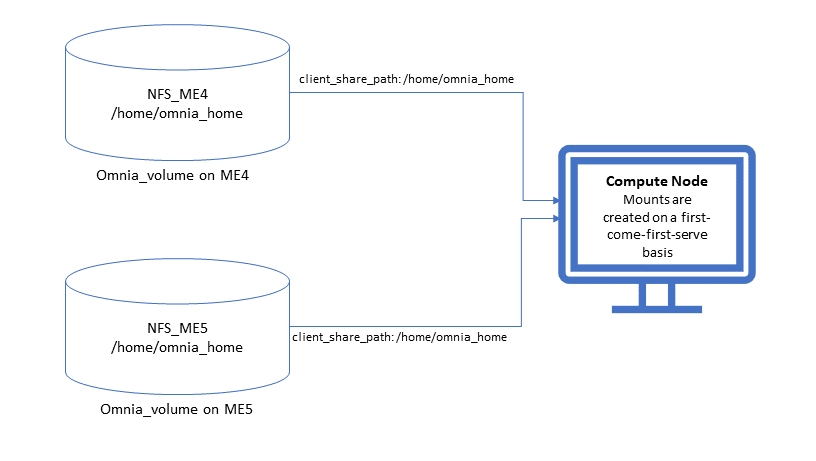
⦾ Why is my NFS mount not visible on the client?
Potential Cause: The directory being used by the client as a mount point is already in use by a different NFS export.
Resolution: Verify that the directory being used as a mount point is empty by using cd <client share path> | ls or mount | grep <client share path>. If empty, re-run the playbook.
⦾ Why does the “BeeGFS-client” service fails?
Potential Causes:
SELINUX may be enabled. (use
sestatusto diagnose the issue)Ports 8008, 8003, 8004, 8005 and 8006 may be closed. (use
systemctl status beegfs-mgmtd, systemctl status beegfs-meta, systemctl status beegfs-storageto diagnose the issue)The BeeGFS set up may be incompatible with RHEL.
Resolutions:
If SELinux is enabled, update the file
/etc/sysconfig/selinuxand reboot the server.Open all ports required by BeeGFS: 8008, 8003, 8004, 8005 and 8006
Check the support matrix for RHEL or Rocky Linux to verify your setup.
For further insight into the issue, check out
/var/log/beegfs-client.logon nodes where the BeeGFS client is running.
⦾ What to do if NFS clients are unable to access the share after an NFS server reboot?
Resolution: Reboot the NFS server (external to the cluster) to bring up the services again:
systemctl disable nfs-server
systemctl enable nfs-server
systemctl restart nfs-server
⦾ What to do if the mounted BeeGFS storage is not accessible with the following error?
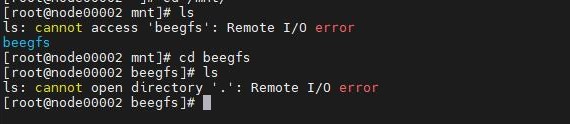
Resolution: Re-deploy the BeeGFS storage using the storage.yml playbook. For more information, click here.
If you have any feedback about Omnia documentation, please reach out at omnia.readme@dell.com.