Local Repositories
⦾ Why does running local_repo.yml fail with connectivity errors?
Potential Cause: The OIM was unable to reach a required online resource due to a network glitch.
Resolution: Verify all connectivity and re-run the playbook.
⦾ Why does any script that installs software fail with The checksum for <software repository path> did not match. error?
Potential Cause: A local repository for the software has not been configured by the local_repo.yml playbook.
Resolution:
Delete the tarball/image/deb of the software from
<repo_path>/cluster/tarball.Re-run
local_repo.yml.Re-run the script to install the software.
⦾ Why does the TASK [configure_registry : Start and enable nerdctl-registry service fail with Job for nerdctl-registry.service failed because the control process exited with error code ?

Potential Causes:
The subnet 10.4.0.0/24 has been assigned to the admin, bmc, or additional network. nerdctl uses this subnet by default and cannot be assigned to any other interface in the system.
The docker pull limit has been breached.
Resolutions:
Reassign the conflicting network to a different subnet.
Update
input/provision_config_credentials.ymlwith thedocker_usernameanddocker_password.
⦾ Why does the TASK [parse_and_download : Get libssl package] fail during local_repo.yml execution?
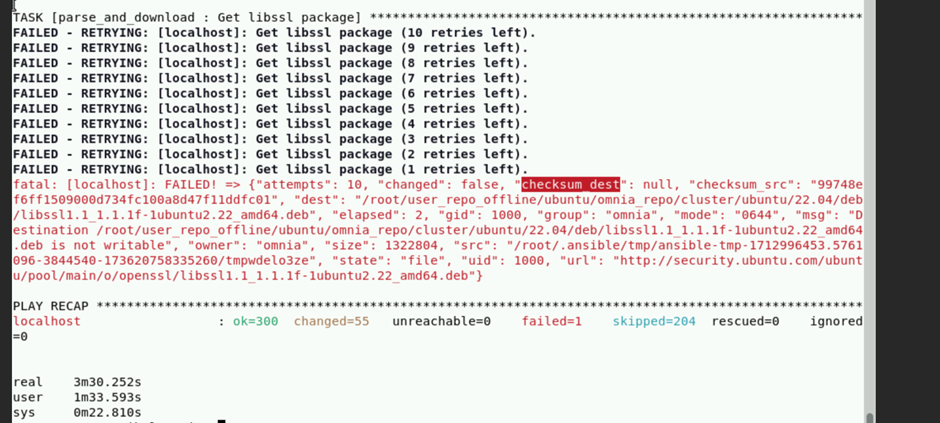
Potential Cause: Executing local_repo.yml with repo_store_path set as an NFS share, but lacking the necessary permissions to access it from the OIM.
Resolution: Provide the required (read, write, and execute) permissions for the NFS share. Verify the permissions of NFS share from the root user of the OIM.
⦾ Why does the TASK [configure_repos : Generate metadata for repositories] fails during the execution of local_repo.yml on RHEL clusters, if the Epel repository is unstable?
Potential Cause: If the external Epel repository link mentioned in omnia_repo_url_rhel is not stable, then it can cause failures in local_repo.yml playbook execution.
Resolution:
Check if the Epel repository link mentioned in
omnia_repo_url_rhelis accessible.Verify the required software listed in
software_config.json, by examining the corresponding<software>.jsonfiles located in theinput/config/rhel/directory. User can do either of the following, based on the findings:If none of the packages are dependent on the Epel repository, users can remove the Epel repository URL from
omnia_repo_url_rhel.If any package required from the Epel repository is listed in the
software_config.jsonfile, it’s advisable to either wait for the Epel repository to stabilize or host those Epel repository packages locally. Afterward, remove the Epel repository link fromomnia_repo_url_rheland provide the locally hosted URL for the Epel repository packages via theuser_repo_urlvariable.
⦾ Why does omnia.yml execution fail during the TASK [Kubernetes_sigs.kubesprate.container-engine/runc : Download_file | Create dest directory on node] ?
Potential Cause: This issue may arise if the directory path specified as the repo_store_path in the input/local_repo_config.yml does not have 755 permissions.
Resolution: Ensure that not only the omnia_repo folder, but also the entire repo_store_path, has 755 permissions. For example, if you specify /root/opt/omnia_repo as the repo_store_path, the /root directory also must have 755 permissions.
If you have any feedback about Omnia documentation, please reach out at omnia.readme@dell.com.