Known issues
⦾ Why doesn’t my newly discovered server list a MAC ID in the cluster.nodeinfo table?
Due to internal MAC ID conflicts on the target nodes, the MAC address will be listed against the target node using this format MAC ADDRESS 1 | MAC ADDRESS 2! *NOIP* in the xCAT node object.

⦾ Why does the task Assign admin NIC IP fail during discovery_provision.yml with errors?

Potential Cause: Omnia validates the admin NIC IP on the control plane. If the user has not assigned an admin NIC IP in case of dedicated network interface type, an error message is returned. There is a parsing logic that is being applied on the blank IP and hence, the error displays twice.
Resolution: Ensure a control plane IP is assigned to the admin NIC.
⦾ Why are some target servers not reachable after PXE booting them?
Potential Causes:
The server hardware does not allow for auto rebooting
The process of PXE booting the node has stalled.
Resolution:
Login to the iDRAC console to check if the server is stuck in boot errors (F1 prompt message). If true, clear the hardware error or disable POST (PowerOn Self Test).
Hard-reboot the server to bring up the server and verify that the boot process runs smoothly. (If it gets stuck again, disable PXE and try provisioning the server via iDRAC.)
⦾ Why does the Task [infiniband_switch_config : Authentication failure response] fail with the message ‘Status code was -1 and not [302]: Request failed: <urlopen error [Errno 111] Connection refused>’ on Infiniband Switches when running infiniband_switch_config.yml?
Potential Cause: To configure a new Infiniband Switch, HTTP and JSON gateway must be enabled. To verify that they are enabled, run:
To check if HTTP is enabled: show web
To check if JSON Gateway is enabled: show json-gw
Resolution: To correct the issue, run:
To enable the HTTP gateway: web http enable
To enable the JSON gateway: json-gw enable
⦾ Why does PXE boot fail with tftp timeout or service timeout errors?
Potential Causes:
RAID is configured on the server.
Two or more servers in the same network have xCAT services running.
The target cluster node does not have a configured PXE device with an active NIC.
Resolution:
Create a Non-RAID or virtual disk on the server.
Check if other systems except for the control plane have
xcatdrunning. If yes, then stop the xCAT service using the following commands:systemctl stop xcatd.On the server, go to BIOS Setup -> Network Settings -> PXE Device. For each listed device (typically 4), configure an active NIC under
PXE device settings
⦾ Why does running local_repo.yml fail with connectivity errors?
Potential Cause: The control plane was unable to reach a required online resource due to a network glitch.
Resolution: Verify all connectivity and re-run the playbook.
⦾ Why does any script that installs software fail with “The checksum for <software repository path> did not match.”?
Potential Cause: A local repository for the software was not configured by local_repo.yml.
Resolution:
Delete the tarball/image/deb of the software from
<repo_path>/cluster/tarball.Re-run
local_repo.yml.Re-run the script to install the software.
⦾ Why do Kubernetes Pods show “ImagePullBack” or “ErrPullImage” errors in their status?
Potential Cause: The errors occur when the Docker pull limit is exceeded. Resolution:
Ensure that the
docker_usernameanddocker_passwordare provided ininput/provision_config_credentials.yml.For a HPC cluster, during
omnia.ymlexecution, a kubernetes secret ‘dockerregcred’ will be created in default namespace and patched to service account. User needs to patch this secret in their respective namespace while deploying custom applications and use the secret as imagePullSecrets in yaml file to avoid ErrImagePull. Click here for more info.
Note
If the playbook is already executed and the pods are in ImagePullBack state, then run kubeadm reset -f in all the nodes before re-executing the playbook with the docker credentials.
⦾ Why does the task ‘Gather facts from all the nodes’ get stuck when re-running omnia.yml?
Potential Cause: Corrupted entries in the /root/.ansible/cp/ folder. For more information on this issue, check this out!
Resolution: Clear the directory /root/.ansible/cp/ using the following commands:
cd /root/.ansible/cp/

rm -rf *
Alternatively, run the task manually:
cd omnia/utils/cluster
ansible-playbook gather_facts_resolution.yml
⦾ What to do if the nodes in a Kubernetes cluster reboot?
Resolution: Wait for 15 minutes after the Kubernetes cluster reboots. Next, verify the status of the cluster using the following commands:
kubectl get nodeson the kube_control_plane to get the real-time kubernetes cluster status.kubectl get pods all-namespaceson the kube_control_plane to check which the pods are in the Running state.kubectl cluster-infoon the kube_control_plane to verify that both the kubernetes master and kubeDNS are in the Running state.
⦾ What to do when the Kubernetes services are not in “Running” state:
Resolution:
Run
kubectl get pods all-namespacesto verify that all pods are in the Running state.If the pods are not in the Running state, delete the pods using the command:
kubectl delete pods <name of pod>Run the corresponding playbook that was used to install Kubernetes:
omnia.yml,jupyterhub.yml, orkubeflow.yml.
⦾ Why do Kubernetes Pods stop communicating with the servers when the DNS servers are not responding?
Potential Cause: The host network is faulty causing DNS to be unresponsive
Resolution:
In your Kubernetes cluster, run
kubeadm reset -fon all the nodes.On the management node, edit the
omnia_config.ymlfile to change the Kubernetes Pod Network CIDR. The suggested IP range is 192.168.0.0/16. Ensure that the IP provided is not in use on your host network.List k8s in
input/software_config.jsonand re-runomnia.yml.
⦾ What to do if pulling the Kserve inference model fail with “Unable to fetch image “kserve/sklearnserver:v0.11.2”: failed to resolve image to digest: Get “https://index.docker.io/v2/”: dial tcp 3.219.239.5:443: i/o timeout.”?
Resolution:
Edit the kubernetes configuration map:
kubectl edit configmap -n knative-serving config-deployment
Add docker.io and index.docker.io as part of the registries-skipping-tag-resolving.
For more information, click here.
⦾ Why does the ‘Initialize Kubeadm’ task fail with ‘nnode.Registration.name: Invalid value: "<Host name>"’?
Potential Cause: The control_plane playbook does not support hostnames with an underscore in it such as ‘mgmt_station’.
Resolution: As defined in RFC 822, the only legal characters are the following:
Alphanumeric (a-z and 0-9): Both uppercase and lowercase letters are acceptable, and the hostname is not case-sensitive. In other words, omnia.test is identical to OMNIA.TEST and Omnia.test.
Hyphen (-): Neither the first nor the last character in a hostname field should be a hyphen.
Period (.): The period should be used only to delimit fields in a hostname (For example, dvader.empire.gov)
⦾ What to do when Kubeflow pods are in ‘ImagePullBackOff’ or ‘ErrImagePull’ status after executing kubeflow.yml?
Potential Cause: Your Docker pull limit has been exceeded. For more information, click here.
Resolution:
Delete Kubeflow deployment by executing the following command in kube_control_plane:
kfctl delete -V -f /root/k8s/omnia-kubeflow/kfctl_k8s_istio.v1.0.2.yamlRe-execute
kubeflow.ymlafter 8-9 hours
⦾ What to do when omnia.yml fails while completing the security role, and returns the following error message: ‘Error: kinit: Connection refused while getting default cache’?
Resolution:
Start the sssd-kcm.socket:
systemctl start sssd-kcm.socketRe-run
omnia.yml
⦾ What to do if slurmd services do not start after running omnia.yml playbook?
Resolution: Run the following command to manually restart slurmd services on the nodes
systemctl restart slurmd
⦾ What to do when Slurm services do not start automatically after the cluster reboots:
Resolution:
Manually restart the slurmd services on the kube_control_plane by running the following commands:
systemctl restart slurmdbd
systemctl restart slurmctld
systemctl restart prometheus-slurm-exporter
Run
systemctl status slurmdto manually restart the following service on all the cluster nodes.
⦾ What to do if new slurm node is not added to sinfo output of slurm control node when restart_slurm_services in omnia_config.yml is set to “false”?
Resolution:
Run the following command on slurm control node:
systemctl restart slurmctld
Verify if the slurm node was added, using:
sinfo
⦾ Why do Slurm services fail?
Potential Cause: The slurm.conf is not configured properly.
Resolution:
Run the following commands:
slurmdbd -Dvvv
slurmctld -Dvvv
Refer the
/var/lib/log/slurmctld.logfile for more information.
⦾ What causes the “Ports are Unavailable” error?
Potential Cause: Slurm database connection fails.
Resolution:
Run the following commands::
slurmdbd -Dvvv
slurmctld -Dvvv
Refer the
/var/lib/log/slurmctld.logfile.Check the output of
netstat -antp | grep LISTENfor PIDs in the listening state.If PIDs are in the Listening state, kill the processes of that specific port.
Restart all Slurm services:
slurmctl restart slurmctld on slurm_control_node

systemctl restart slurmdbd on slurm_control_node

systemctl restart slurmd on slurm_node
⦾ Why does the task ‘nfs_client: Mount NFS client’ fail with ``Failed to mount NFS client. Make sure NFS Server is running on IP xx.xx.xx.xx``?
Potential Cause: The required services for NFS may not have been running:
nfs
rpc-bind
mountd
Resolution: Enable the required services using firewall-cmd --permanent --add-service=<service name> and then reload the firewall using firewall-cmd --reload.
⦾ What to do when omnia.yml execution fails with nfs-server.service might not be running on NFS Server. Please check or start services?
Potential Cause: nfs-server.service is not running on the target node.
Resolution: Use the following commands to bring up the service:
systemctl start nfs-server.service

systemctl enable nfs-server.service
⦾ Why does the task `configure registry: Start and enable nerdctl-registry service` fail with “Job for nerdctl-registry.service failed because the control process exited with error code”?
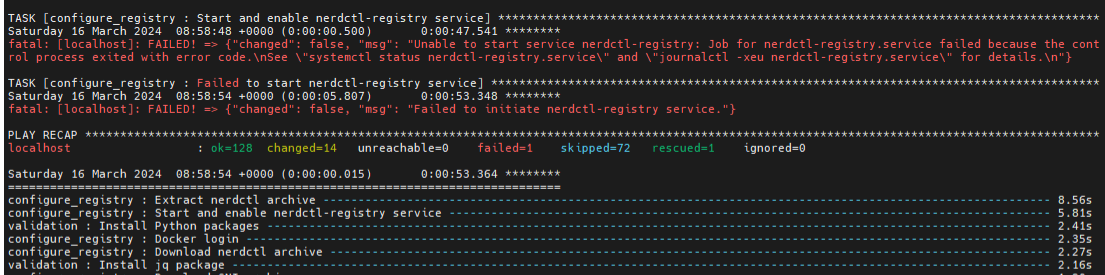
Potential Causes:
The subnet 10.4.0.0/24 has been assigned to the admin, bmc, or additional network. nerdctl uses this subnet by default and cannot be assigned to any other interface in the system.
The docker pull limit has been breached.
Resolutions:
Reassign the conflicting network to a different subnet.
Update
input/provision_config_credentials.ymlwith thedocker_usernameanddocker_password.
⦾ Why does the task ‘Install Packages’ fail on the NFS node with the message: Failure in talking to yum: Cannot find a valid baseurl for repo: base/7/x86_64.
Potential Cause: There are connections missing on the NFS node.
Resolution:
Ensure that there are 3 NICs being used on the NFS node:
For provisioning the OS
For connecting to the internet (Management purposes)
For connecting to PowerVault (Data Connection)
⦾ What to do when the JupyterHub or Prometheus UI is not accessible?
Resolution: Run the command kubectl get pods namespace default to ensure nfs-client pod and all Prometheus server pods are in the Running state.
⦾ What to do if PowerVault throws the error: The specified disk is not available. - Unavailable disk (0.x) in disk range ‘0.x-x’:
Resolution:
Verify that the disk in question is not part of any pool using:
show disksIf the disk is part of a pool, remove it and try again.
⦾ Why does PowerVault throw the error: You cannot create a linear disk group when a virtual disk group exists on the system.?
Potential Cause: At any given time only one type of disk group can be created on the system. That is, all disk groups on the system have to exclusively be linear or virtual.
Resolution: To fix the issue, either delete the existing disk group or change the type of pool you are creating.
⦾ Why does the task ‘nfs_client: Mount NFS client’ fail with the message “No route to host”?
Potential Cause: There’s a mismatch in the share path listed in /etc/exports and in omnia_config.yml under nfs_client_params.
Resolution: Ensure that the input paths are a perfect match to avoid any errors.
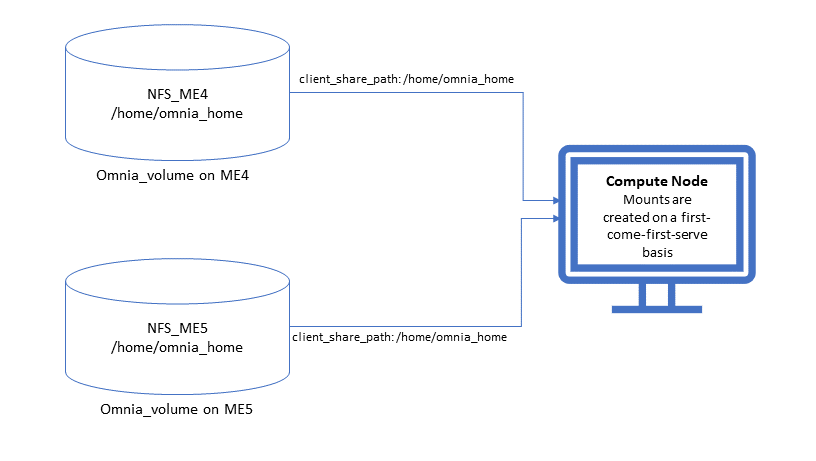
⦾ Why is my NFS mount not visible on the client?
Potential Cause: The directory being used by the client as a mount point is already in use by a different NFS export.
Resolution: Verify that the directory being used as a mount point is empty by using cd <client share path> | ls or mount | grep <client share path>. If empty, re-run the playbook.
⦾ Why does the “BeeGFS-client” service fail?
Potential Causes:
SELINUX may be enabled. (use
sestatusto diagnose the issue)Ports 8008, 8003, 8004, 8005 and 8006 may be closed. (use
systemctl status beegfs-mgmtd, systemctl status beegfs-meta, systemctl status beegfs-storageto diagnose the issue)The BeeGFS set up may be incompatible with RHEL.
Resolutions:
If SELinux is enabled, update the file
/etc/sysconfig/selinuxand reboot the server.Open all ports required by BeeGFS: 8008, 8003, 8004, 8005 and 8006
Check the support matrix for RHEL or Rocky Linux to verify your set-up.
For further insight into the issue, check out
/var/log/beegfs-client.logon nodes where the BeeGFS client is running.
⦾ Why does the task ‘security: Authenticate as admin’ fail?
Potential Cause: The required services are not running on the node. Verify the service status using:
systemctl status sssd-kcm.socket

systemctl status sssd.service
Resolution:
Restart the services using:
systemctl start sssd-kcm.socket
systemctl start sssd.service
Re-run
omnia.ymlusing:ansible-playbook omnia.yml
⦾ Why would FreeIPA server/client installation fail? (version 1.5 and below)
Potential Cause:
The hostnames of the auth server nodes are not configured in the correct format.
Resolution:
If you have enabled the option to install the login node in the cluster, set the hostnames of the nodes in the format: hostname.domainname. For example, authserver_node.omnia.test is a valid hostname for the auth server node.
Note
To find the cause for the failure of the FreeIPA server and client installation, see ipaserver-install.log in the auth server.
⦾ What to do when JupyterHub pods are in ‘ImagePullBackOff’ or ‘ErrImagePull’ status after executing jupyterhub.yml:
Potential Cause: Your Docker pull limit has been exceeded. For more information, click here.
Resolution:
Delete Jupyterhub deployment by executing the following command in kube_control_plane:
helm delete jupyterhub -n jupyterhubRe-execute
jupyterhub.ymlafter 8-9 hours.
⦾ What to do if NFS clients are unable to access the share after an NFS server reboot?
Reboot the NFS server (external to the cluster) to bring up the services again:
systemctl disable nfs-server
systemctl enable nfs-server
systemctl restart nfs-server
⦾ Why do Kuberneteschildnode & kubernetesnodes log as Pass in the database even if there are nodes in the Ready,Schedulingdisabled state?
Potential Cause: Omnia telemetry considers Ready,SchedulingDisabled as a Ready state of Kubernetes nodes . So, even if the kubectl get nodes command shows any node’s state as Ready,SchedulingDisabled, the entry in DB for Kuberneteschildnode & kubernetesnodes will be logged as Pass instead of Fail.
⦾ What to do if omnia.yml playbook execution fails with MetalLB, a load-balancer for bare metal Kubernetes cluster?
Resolution:
If your omnia.yml playbook execution fails while waiting for the MetalLB controller to be up and running, you need to wait for the MetalLB pods to come to running state and then re-run omnia.yml/scheduler.yml.
⦾ What to do if omnia.yml playbook execution fails to execute “kubeadm join” or “kubeadm init” command?
Potential Cause: An additional active NIC other than the admin NIC is present on the kube_control_plane, with an active internet connection and lower metric value.
Resolution: Perform the following steps:
If
kubeadm join/kubeadm initcommand fails, either one of the following should be done:Run
kubeadm reset -fon the node wherekubeadm join/kubeadm initcommand fails.Reset the cluster using
utils/reset_cluster_configuration.yml.
After the cluster has been reset, inventory should be updated with argument
ip, andipshould have the value of required admin IP in case node has more than one network interface. Ifkube_control_planehas 2 interfaceseno1andeno2with IPseno1=10.5.0.3andeno2=198.168.0.19, inventory should have the following format:[kube_control_plane] 10.5.0.3 ip=10.5.0.3 [kube_node] 10.5.0.4 ip=10.5.0.4 [etcd] 10.5.0.3 ip=10.5.0.3
Re-run
omnia.ymlplaybook with the updated inventory file.
⦾ What to do if local_repo.yml execution fails with the following error:
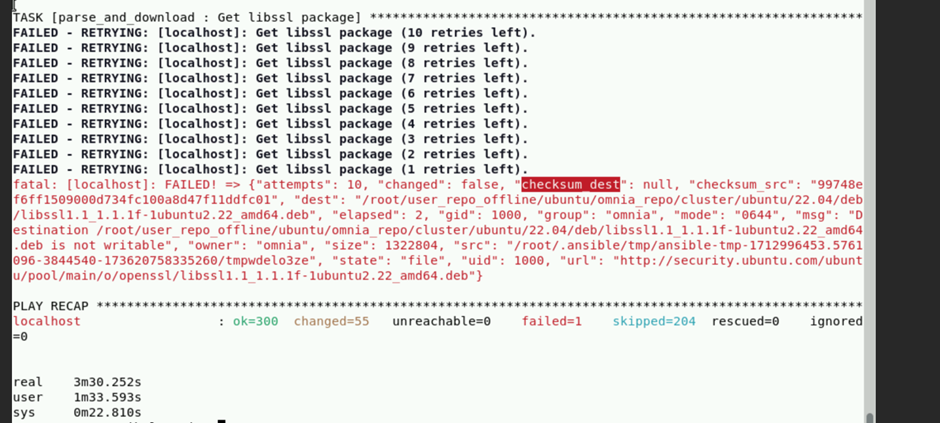
Potential Cause: Executing local_repo.yml with repo_store_path set as an NFS share, but lacking the necessary permissions to access it from the control plane.
Resolution: Provide the required (read, write, and execute) permissions for the NFS share. Verify the permissions of NFS share from the root user of the control plane.
⦾ What to do if omnia.yml execution fails with a “403: Forbidden” error when an NFS share is provided as the repo_store_path?

Potential Cause: For omnia.yml execution, the NFS share folder provided in repo_store_path must have 755 permissions.
Resolution: Ensure that the NFS share folder provided as the repo_store_path has 755 permissions, and re-run omnia.yml.
⦾ omnia.yml or scheduler.yml playbook execution fails with the following error:

Potential Cause: This error occurs when the Kubespray collection is not installed during the execution of prepare_cp.yml.
Resolution: Re-run prepare_cp.yml.
⦾ NFS-client provisioner is in “ContainerCreating” or “CrashLoopBackOff” state.


Potential Cause: This issue usually occurs when server_share_path given in storage_config.yml for k8s_share does not have an NFS server running.
Resolution:
Ensure that
storage.ymlis executed on the same inventory which is being used forscheduler.yml.Ensure that
server_share_pathmentioned instorage_config.ymlfork8s_share: truehas an active nfs_server running on it.
⦾ Nfs-client provisioner is in “ContainerCreating” or “CrashLoopBackOff” state and “kubectl describe <pod_name>” shows the following output:

Potential Cause: This is a known issue. For more information, click here.
Resolution:
Wait for some time for the pods to come up. OR
Do the following:
Run the following command to delete the pod:
kubectl delete pod <pod_name> -n <namespace>Post deletion, the pod will be restarted and it will come to running state.
⦾ What to do if slurmctld services fails when slurm_installaton_type is nfs_share during omnia.yml execution?
Potential Cause: This issue may arise due to internal network issues.
Resolution: Re-run the playbook with same configuration and verify the status of slurmctld service in the slurm control node.
⦾ Why does the task ‘Parse and Download: Display Failed Packages’ fail while running prepare_upgrade.yml?
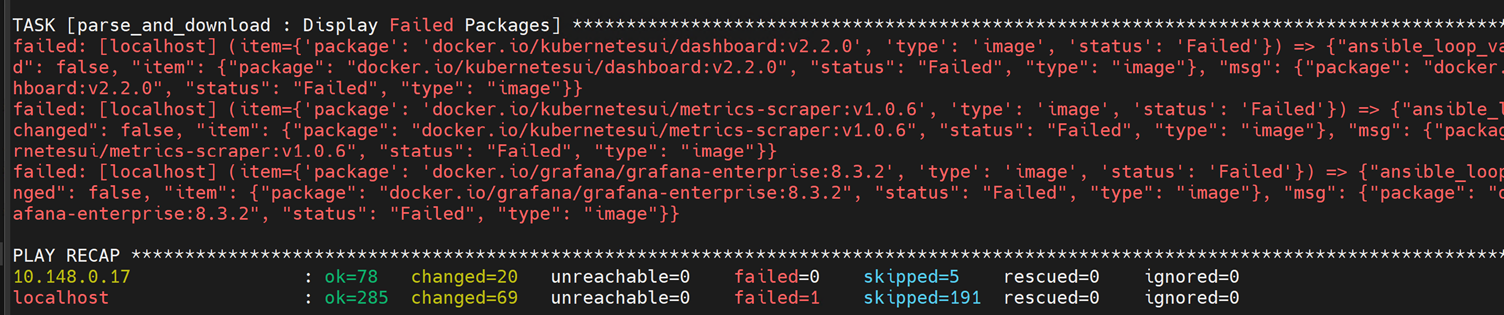
Potential Cause: This issue may arise while setting up of local repo for Omnia v1.6 and can occur due to internet connection issues on control plane.
Resolution: Verify that the internet connectivity on control plane is stable and re-run the prepare_upgrade.yml playbook.
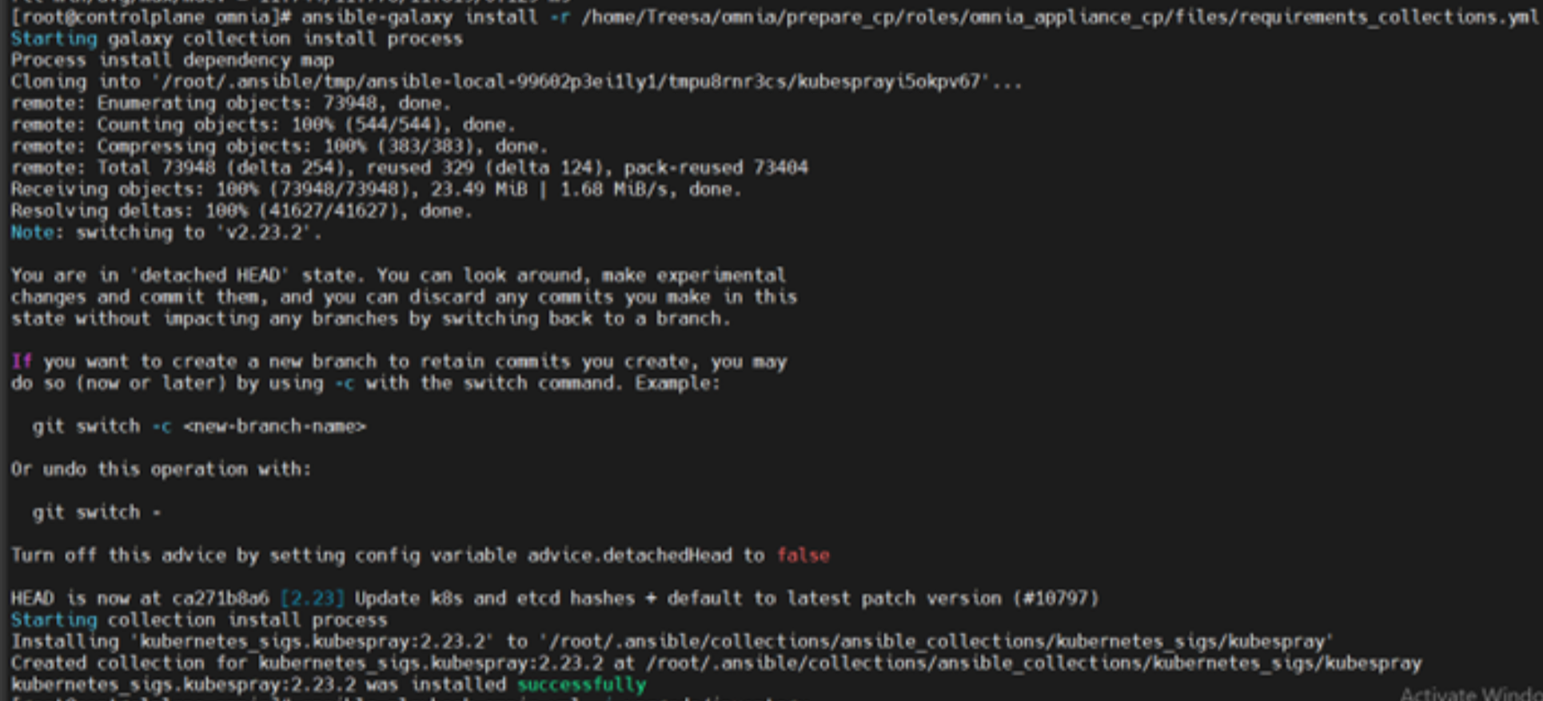
⦾ Why does omnia.yml (or upgrade.yml, in case of upgrade) fail with an error “Unable to retrieve file contents. Could not find or access… kubernetes_sigs.kubespray.cluster on the Ansible Controller”?

Potential Cause: This issue may arise when the task ‘prepare_cp/roles/omnia_appliance_cp: Install Kubespray ansible-collection’ in prepare_upgrade.yml silently passes (as shown in the following image), without installing the Kubespray ansible-collection. This can happen due to unstable internet connectivity on control plane during installation.
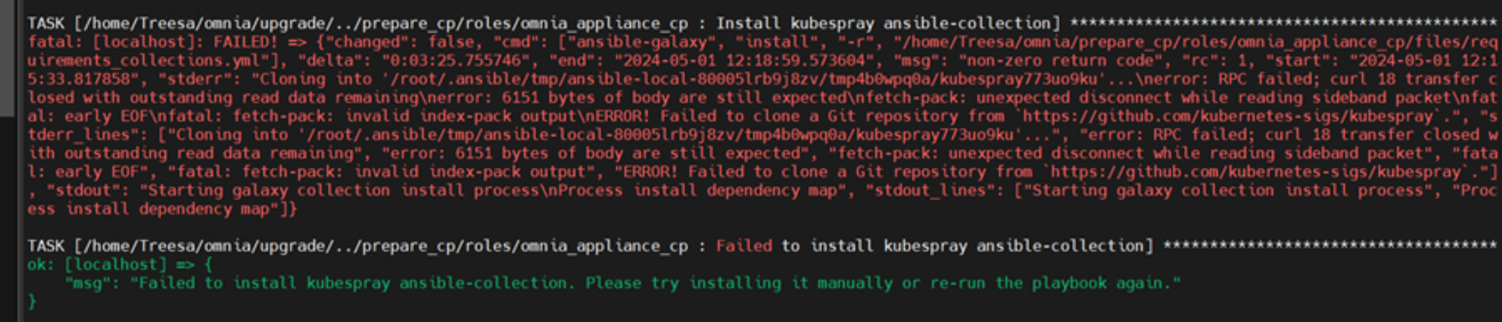
Resolution: Manually try to install the Kubespray ansible-collection as shown below and re-run the omnia.yml playbook (or upgrade.yml playbook in case of upgrade):
⦾ Why does the task ‘loki: Start Docker Service’ fail at “Job for docker.service failed because the control process exited with error code” while running upgrade.yml?
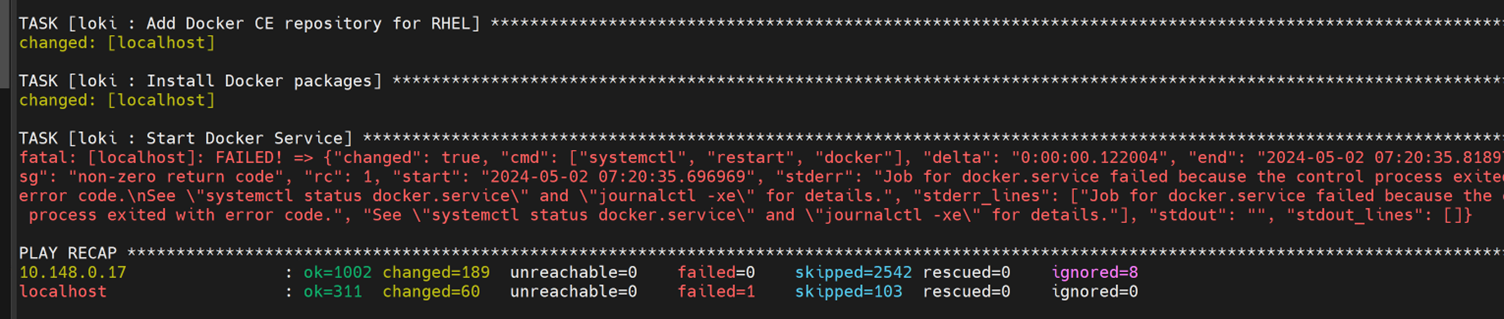
Potential Cause: This issue may arise when the ‘docker0’ interface is already bound to a zone in the firewall settings and Docker tries to use this interface, resulting in a ‘Zone Conflict’.
Resolution: Perform the following steps to adjust your firewall settings, allowing Docker to utilize the ‘docker0’ interface without encountering conflicts.
Add the the docker0 interface to the docker zone using the following command:
sudo firewall-cmd --zone=docker --add-interface=docker0 --permanent
Reload the firewall to apply the changes, using the following command:
sudo firewall-cmd --reload
Restart docker service to ensure it picks up the changes, using the following command:
sudo systemctl restart docker
Finally, run the following command to ensure docker service is active and running:
systemctl status docker
After performing all the above steps, re-run upgrade.yml playbook.
⦾ Why does the nvidia-device-plugin pods in ContainerCreating status fails with “no runtime for “nvidia” in configured” error?

Potential Cause: nvidia-container-toolkit is not installed on GPU nodes.
Resolution: Go to Install Kubernetes and follow the steps to download nvidia-container-toolkit and perform the necessary configurations based on the OS running on the cluster.
⦾ While provisioning a node in an Ubuntu cluster, “Installing” status is not displayed in cluster.nodeinfo table.
Resolution: User can track provisioning progress by checking the supported status types. If the status shows bmcready or powering-on, user can infer that the node is being provisioned. Once the node has been provisioned successfully, it will reflect a booted status in the OmniaDB.
⦾ ``discovery_provision.yml`` fails to check for duplicate disk_partition values in provision_config.yml
Resolution: User needs to ensure that there are no duplicate entries for the same partition in provision_config.yml.
⦾ After executing ``disocvery_provision.yml``, the node status in OmniaDB reflects as “standingby”?
Resolution: For any discovery mechanism other than switch-based, do the following:
Execute the following command:
chdef <node> status=””Then run:
rinstall <node>Where <node> refers to the node column in the OmniaDB, which has a “standingby” status.
⦾ While executing local_repo.yml playbook, subgroup entries for applicable software is not validated during playbook execution.
Resolution: User must provide the software subgroup (if required) for the respective software in input/software_config.json. For more information, click here.
⦾ The “TASK [configure_repos : Generate metadata for repositories]” fails during the execution of local_repo.yml on RHEL clusters if the Epel repository is unstable.
Potential Cause: If the external Epel repository link mentioned in omnia_repo_url_rhel is not stable, then it can cause failures in local_repo.yml playbook execution.
Resolution:
Check if the Epel repository link mentioned in
omnia_repo_url_rhelis accessible.Verify the required software listed in
software_config.json, by examining the corresponding<software>.jsonfiles located in theinput/config/rhel/directory. User can do either of the following, based on the findings:If none of the packages are dependent on the Epel repository, users can remove the Epel repository URL from
omnia_repo_url_rhel.If any package required from the Epel repository is listed in the
software_config.jsonfile, it’s advisable to either wait for the Epel repository to stabilize or host those Epel repository packages locally. Afterward, remove the Epel repository link fromomnia_repo_url_rheland provide the locally hosted URL for the Epel repository packages via theuser_repo_urlvariable.
⦾ Why does the discovery_provision.yml playbook execution fail at task: “Prepare_cp needs to be executed”?
Potential Cause: Invalid input provided in network_spec.yml for admin_network or bmc_network fields.
Resolution: Perform a cleanup using control_plane_cleanup.yml with --tags provision & then re-run the discovery_provision.yml playbook. Execute the following command:
ansible-playbook utils/control_plane_cleanup.yml --tags provision
ansible-playbook discovery_provision.yml
⦾ After resetting an existing slurm cluster using reset_cluster_config.yml, issues are faced while changing the slurm_installation_type from nfs_share to configless in input/omnia.yml. Post update, possible scenarios observed while executing omnia.yml playbook are:
Playbook execution fails at TASK: [slurm_common : Add the user ‘slurm’ with uid 6001 and a primary group of ‘slurm’].

Playbook execution is successful but the slurm services are inactive.
Potential Causes:
While updating the
slurm_installation_typefromnfs_sharetoconfiglessininput/omnia.yml, the previous ‘slurm’ user is active, which can cause the deletion and addition of the configurations to fail intermittently.NFS share path is not removed from
LD_LIBRARY_PATHenvironment variable while resetting a slurm cluster innfs_sharemode.
Resolution: Perform the following steps:
Remove the NFS share path from
LD_LIBRARY_PATH.Remove
slurmd.servicefile from all the compute nodes in the slurm cluster.Re-run
omnia.ymlplaybook.
⦾ While upgrading Omnia in an NFS-Bolt-On setup, the prepare_config.yml playbook fails to import the nfs_client_params mentioned in input/storage_config.yml for v1.5.1 to Omnia v1.6. Consequently, if the same NFS-Bolt-On share doubles as the Omnia share, the prepare_upgrade.yml playbook fails to unmount it on the head node.
Potential Cause: This issue occurs when client_share_path or client_mount_options in nfs_client_params is left empty.
Resolution: Perform the following steps based on your cluster configuration:
After executing the
prepare_config.ymlplaybook, you need to manually update thenfs_client_paramsininput/storage_config.ymlof Omnia v1.6, in the format mentioned here. Ensure that the values forserver_ip,server_share_path,client_share_path, andclient_mount_optionsare the same between Omnia v1.5.1 and v1.6.
When
enable_omnia_nfsis set totruein Omnia v1.5.1, update thenfs_client_paramsin the format added below# For example, if
nfs_client_paramsin Omnia v1.5.1 is:- { server_ip: 10.6.0.4, server_share_path: "/mnt/nfs_shares/users1", client_share_path: “/users1”, client_mount_options: } - { server_ip: 10.6.0.4, server_share_path: "/mnt/nfs_shares/users1", client_share_path: “/users2”, client_mount_options: }# Then the
nfs_client_paramsin Omnia v1.6 should be updated as:- { server_ip: 10.6.0.4, server_share_path: "/mnt/nfs_shares/users1", client_share_path: “/users1”, client_mount_options: , nfs_server: false, slurm_share: false, k8s_share: false } - { server_ip: 10.6.0.4, server_share_path: "/mnt/nfs_shares/users1", client_share_path: “/users2”, client_mount_options: , nfs_server: false, slurm_share: false, k8s_share: false }Note
Do not remove the auto populated entries in
nfs_client_paramsfrominput/storage_config.yml. The default entry is similar to:{ server_ip: localhost, server_share_path: /mnt/omnia_home_share, client_share_path: /home, client_mount_options: "nosuid,rw,sync,hard,intr", nfs_server: true, slurm_share: true, k8s_share: true }When
enable_omnia_nfsis set tofalseandomnia_usrhome_shareis set to/mnt/nfs_shares/appsharein Omnia v1.5.1, update thenfs_client_paramsin the format added below# For example, if the
nfs_client_paramsin Omnia v1.5.1 is:{ server_ip: 10.6.0.4, server_share_path: "/mnt/nfs_shares/users", client_share_path: , client_mount_options: } { server_ip: 10.6.0.4, server_share_path: "/mnt/nfs_shares/appshare", client_share_path: , client_mount_options: }# Then the
nfs_client_paramsin Omnia v1.6 should be updated as:{ server_ip: 10.6.0.4, server_share_path: "/mnt/nfs_shares/users", client_share_path: , client_mount_options: , nfs_server: false, slurm_share: false, k8s_share: false } { server_ip: 10.6.0.4, server_share_path: "/mnt/nfs_shares/appshare", client_share_path: "/home", client_mount_options: , nfs_server: false, slurm_share: true, k8s_share: true }Note
When
enable_omnia_nfsis set tofalse, theprepare_upgrade.ymlplaybook execution fails while attempting to delete the nfs_share directory from the manager node. In such a scenario, the user needs to manually unmount the Omnia NFS share from the head node and re-run theprepare_upgrade.ymlplaybook.
⦾ While executing discovery_provision.yml playbook from the control plane, some of the cluster nodes fail to boot up and omniadb captures the node status as “failed”.

Potential Cause: This issue is encountered due to any configuration failure during node provisioning.
Resolution: Perform the following steps:
Delete the failed node from the db using
delete_node.ymlplaybook utility. For more information, click here.Re-provision the node by re-running the
discovery_provision.ymlplaybook.
⦾ Kserve deployment occasionally fails on RHEL 8.8 clusters.
Potential Cause: This is a known issue. For more information, check the links attached below:
Resolution: Reprovision the cluster and re-deploy Kserve. The steps to deploy Kserve are located here.
If you have any feedback about Omnia documentation, please reach out at omnia.readme@dell.com.