BeeGFS bolt on
BeeGFS is a hardware-independent POSIX parallel file system (a.k.a. Software-defined Parallel Storage) developed with a strong focus on performance and designed for ease of use, simple installation, and management.
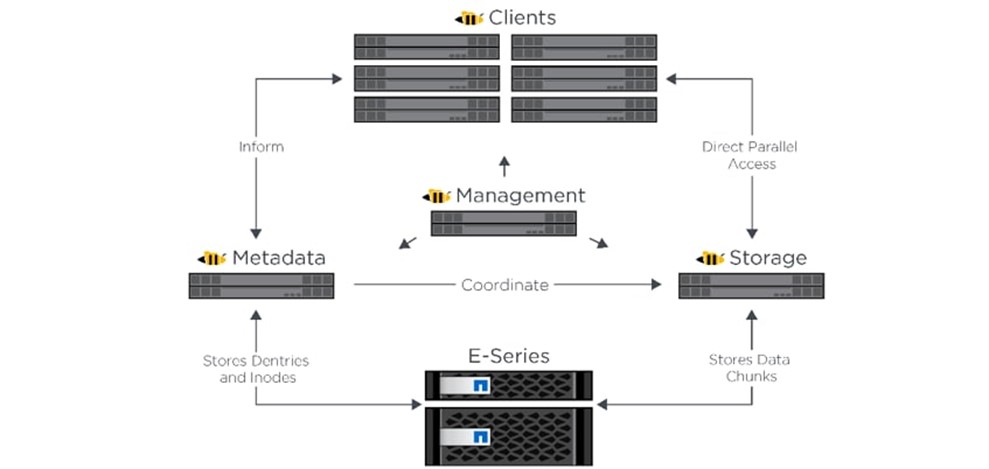
Pre Requisites before installing BeeGFS client
Ensure that the BeeGFS server is set up using the linked steps.
Ensure that a
connAuthFileis configured on the server as explained here
Caution
Configuring a connAuthFile is now mandatory. Services will no longer start if a connAuthFile is not configured
Ensure that the following ports are open for TCP and UDP connectivity:
Port
Service
8008
Management service (beegfs-mgmtd)
8003
Storage service (beegfs-storage)
8004
Client service (beegfs-client)
8005
Metadata service (beegfs-meta)
8006
Helper service (beegfs-helperd)
To open the ports required, use the following steps:
firewall-cmd --permanent --zone=public --add-port=<port number>/tcp
firewall-cmd --permanent --zone=public --add-port=<port number>/udp
firewall-cmd --reload
systemctl status firewalld
Note
BeeGFS services over RDMA is only supported on RHEL 8.3 and above due to limitations on BeeGFS. When setting up your cluster with RDMA support, check the BeeGFS documentation to provide appropriate values in input/storage_config.yml.
If the cluster runs Rocky Linux, ensure that versions running are compatible by checking our support matrix.
Installing the BeeGFS client via Omnia
After the required parameters are filled in input/storage_config.yml, Omnia installs BeeGFS on all nodes while executing the storage.yml playbook.
Caution
Do not remove or comment any lines in the input/storage_config.yml file.
Parameters |
Details |
|---|---|
nfs_client_params
|
|
|
This variable is used if user has RDMA-capable network hardware (e.g., InfiniBand) Choices:
|
|
|
|
BeeGFS management server IP. Note The provided IP should have an explicit BeeGFS management server running . |
|
|
|
Changing this value to true will unmount running instance of BeeGFS client and should only be used when decommisioning BeeGFS, changing the mount location or changing the BeeGFS version. Choices:
|
|
Use this variable to change the BeeGFS version on the target nodes. Choices:
|
ansible_config_file_path
|
|
|
|
Note
BeeGFS client-server communication can take place over TCP or RDMA. If RDMA support is required, set
beegfs_rdma_supportshould be set to true. Also, OFED should be installed on all cluster nodes.For BeeGFS communication happening over RDMA, the
beegfs_mgmt_servershould be provided with the Infiniband IP of the management server.The parameter inventory refers to the inventory file listing all relevant nodes.
If input/storage_config.yml is populated before running omnia.yml, BeeGFS client will be set up during the execution of omnia.yml.
If omnia.yml is not leveraged to set up BeeGFS, execute the storage.yml playbook :
cd storage
ansible-playbook storage.yml -i inventory
If you have any feedback about Omnia documentation, please reach out at omnia.readme@dell.com.